
HEAD-TO-HEAD REVIEW

AI Presentations vs Tome AI: Which AI Presentation Tool Is Better for PPT Workflows?

We compared both tools on presentation quality, PowerPoint compatibility, AI content generation, export formats, editing flexibility, and workflow speed. Here’s which platform works best for different presentation needs and why AI Presentations stands out for creating editable, professional, and presentation-ready PPTX files.

Free tier available · No credit card to try

vs
AI Presentations

AI Presentations

4.6

User rating

2,200+ user ratings

Tome AI

Tome AI

4.5

User rating

Summary

Choose AI Presentations if you need editable PowerPoint decks with reliable PPTX exports, flexible slide editing, and support for multiple AI presentation inputs. Tome AI works better for users focused on visual storytelling, AI-generated narratives, and sharing presentations as interactive web pages.

Where AI Presentations Lead

  • Editable PPTX files that work smoothly in Microsoft PowerPoint
  • Full slide customisation after AI presentation generation
  • Create decks from topics, PDFs, URLs, Word files, and YouTube videos
  • Multiple presentation themes for business, education, and professional use
  • Faster workflow from prompt to downloadable PowerPoint presentation

Where Tome AI Leads

  • AI-powered storytelling and narrative-driven presentations
  • Strong support for multimedia content and embedded web elements
  • Interactive web-based presentation sharing
  • Clean, modern layouts designed for online viewing
  • Collaboration features for teams working on presentation projects

AI Presentation Platforms Compared

Built for Different Presentation Needs

While both platforms use AI to simplify presentation creation, they are designed for different users, workflows, and presentation goals.

AI Presentations: AI-Powered PowerPoint Creation

AI Presentations transforms prompts, PDFs, documents, URLs, and YouTube videos into fully editable slide decks. It is designed for professionals, educators, students, and teams who need structured presentations for meetings, business reports, sales pitches, training sessions, and academic projects.

Users can generate slides, customise layouts, refine content, and export presentations as PPTX or PDF. The platform prioritises editable PowerPoint presentations that are ready for presentation, collaboration, and offline use.

Founded
2024
Best for
Users looking for fast AI-generated presentations with editable PowerPoint exports
Try AI Presentations →
Tome AI

Tome AI: AI Storytelling and Visual Narratives

Tome AI is an AI-native presentation platform focused on storytelling, visual communication, and interactive content experiences. Rather than following a traditional slide-by-slide workflow, it helps users build narrative-driven presentations that combine text, visuals, and multimedia elements.

Users can create presentations from simple prompts, enrich content with media, and share projects through web links. The platform is often chosen for startup pitches, creative storytelling, portfolios, and visually engaging online presentations.

Founded
2020
Best for
Teams and creators who prioritise storytelling, visual content, and web-based presentation sharing
Explore Tome AI

Evaluation Methodology

How We Compared Both AI Presentation Makers

For this comparison, we generated six presentations on both platforms using a mix of business, education, training, and marketing topics. Each tool was tested under the same conditions to understand how effectively it handles AI-powered presentation creation from start to finish. We assessed slide quality, content structure, customization options, export capabilities, workflow efficiency, and presentation readiness. While AI Presentations is designed for creating editable PowerPoint decks, Tome AI focuses more on visual storytelling and web-based presentation delivery. The goal was to identify which tool offers the better experience for different presentation needs.

6

Decks per tool

5

Capability areas

12mo

Price plans reviewed

2

Products in the test

Presentation Creation Process

From Idea to Presentation in Minutes

How AI Presentations and Tome AI generate slide decks.

How AI Presentations Generates Slide Decks

Creating a presentation in AI Presentations follows a simple workflow designed to help users turn ideas, documents, and other content sources into professional slide decks with minimal effort.

  1. 1

    Create Your Account

    Sign up using your email address or continue with your Google account to access the AI presentation generator and start creating presentations.

    AI Presentations sign up
  2. 2

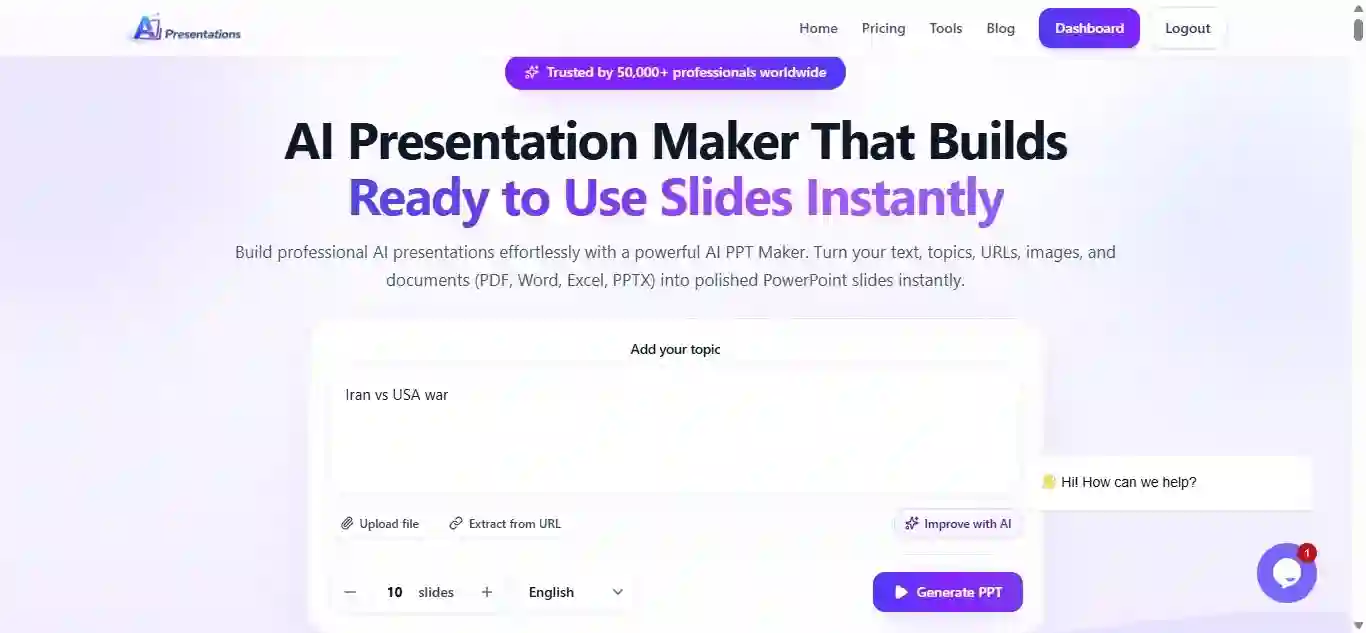
    Describe Your Presentation

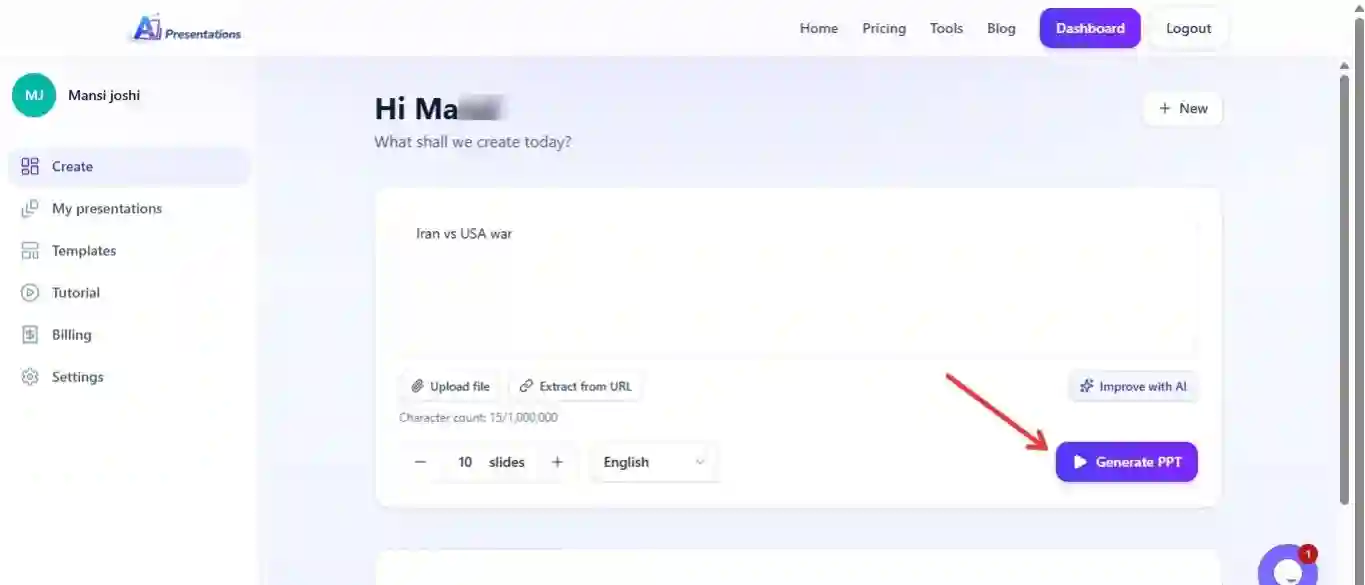
    Enter a topic, presentation prompt, or a short description of what you want to create.

    AI Presentations prompt input
  3. 3

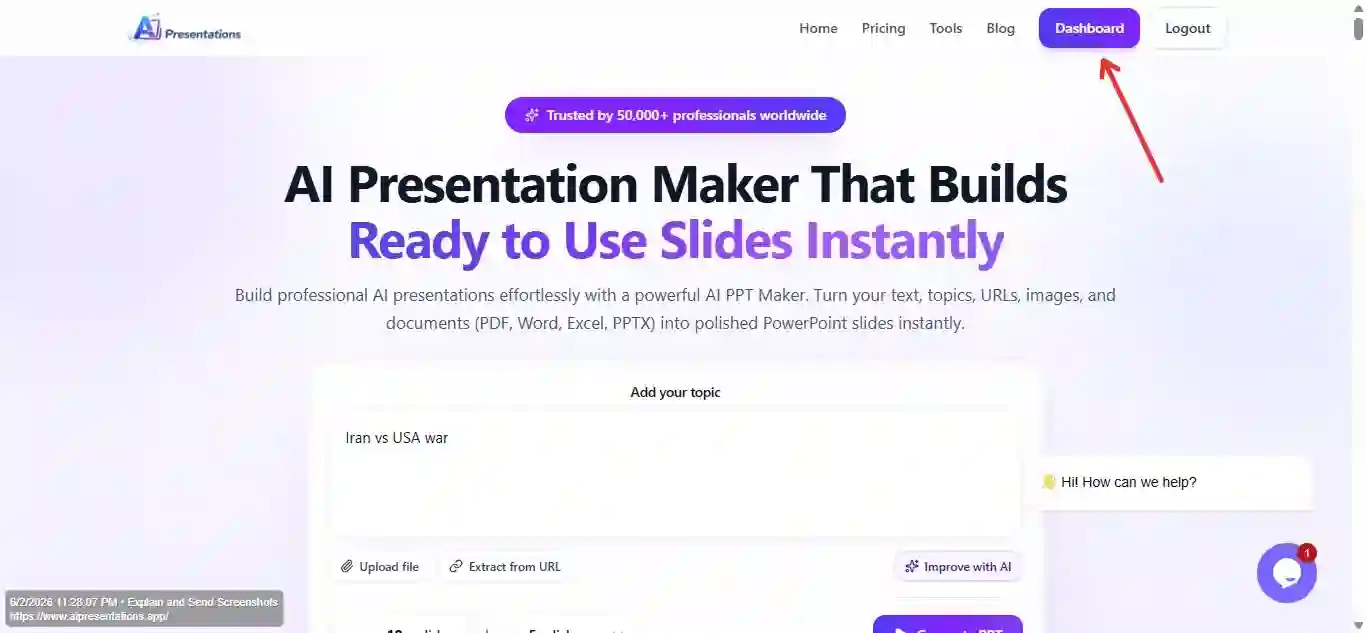
    Access the Workspace

    Open the dashboard to explore presentation templates, AI tools, and content import options.

    AI Presentations dashboard
  4. 4

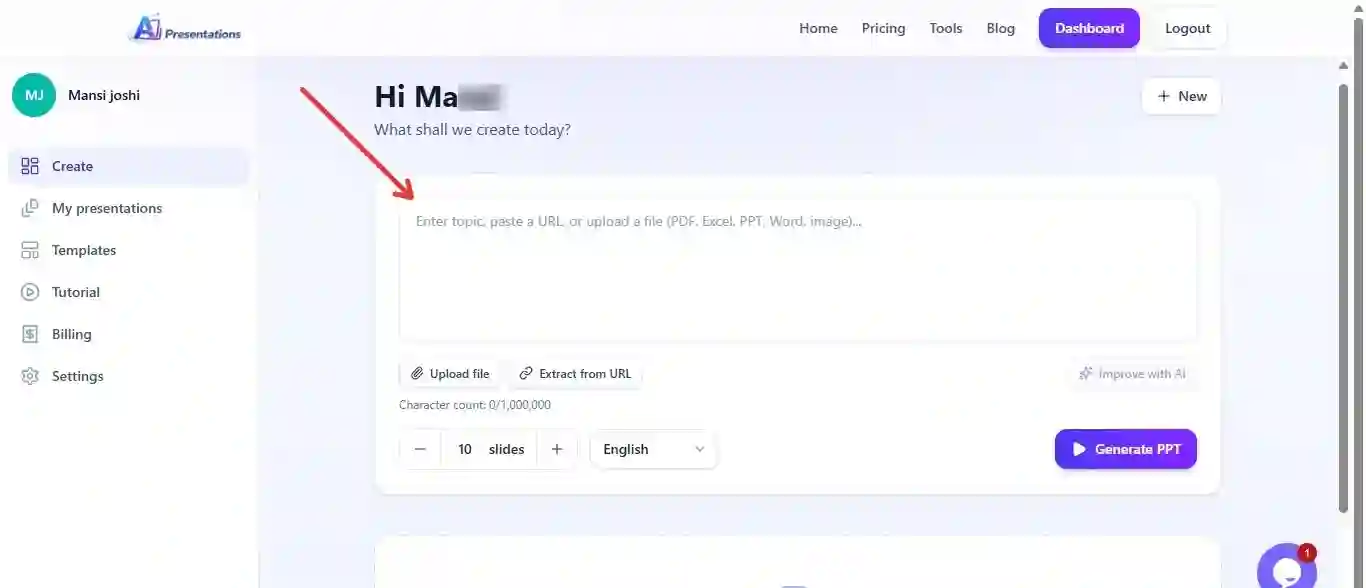
    Pick a Creation Method

    Start with AI-generated slides, build from scratch, or work with an existing presentation file.

    AI Presentations starting point
  5. 5

    Import Your Content

    Add your topic, prompt, PDFs, DOCX documents, webpages, YouTube videos, images, or PowerPoint files as source material.

    AI Presentations source content
  6. 6

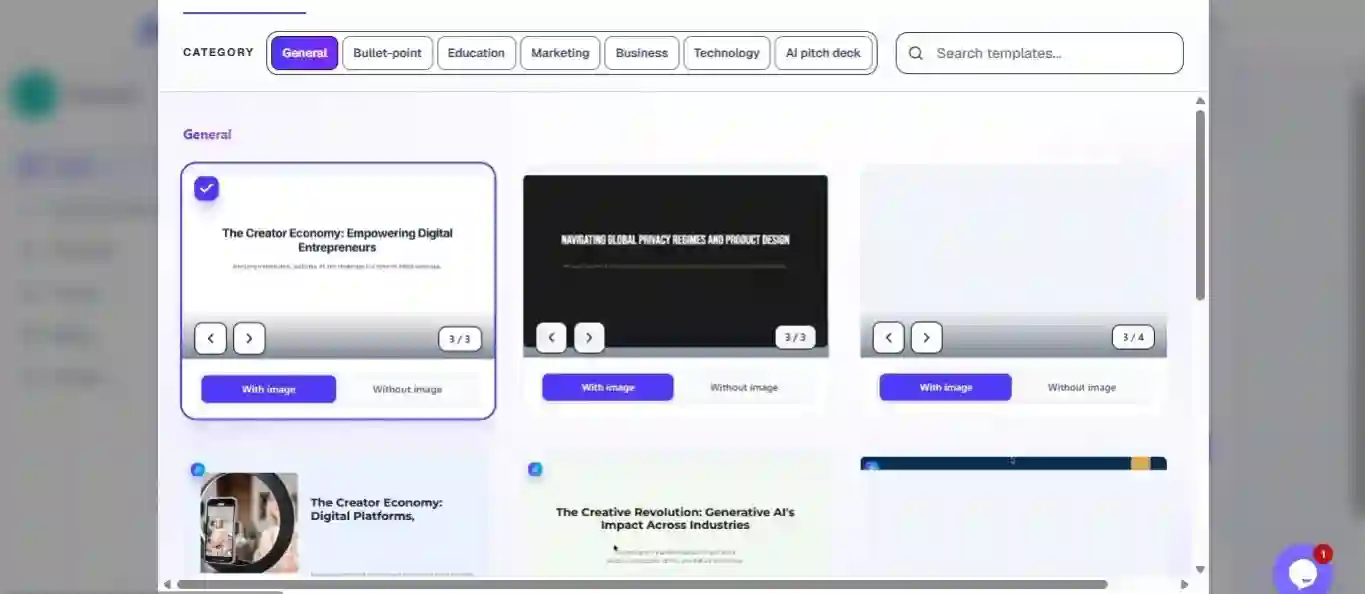
    Apply a Presentation Theme

    Select a presentation design that best fits your topic, audience, or use case.

    AI Presentations generating
  7. 7

    Generate Slide Content

    Allow the AI presentation generator to create a structured outline and slide sequence automatically.

    AI Presentations content upload
  8. 8

    Finalize the Deck Structure

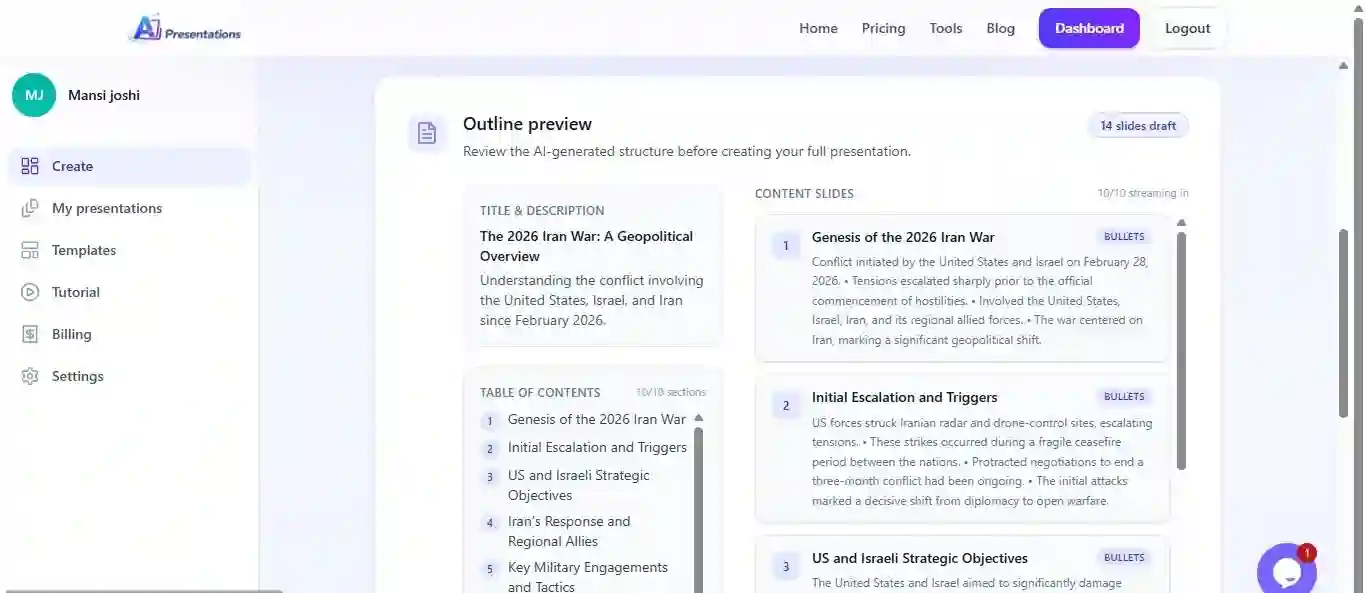
    Review the generated outline and create the complete presentation with a single click.

    AI Presentations review and build
  9. 9

    Refine and Customize

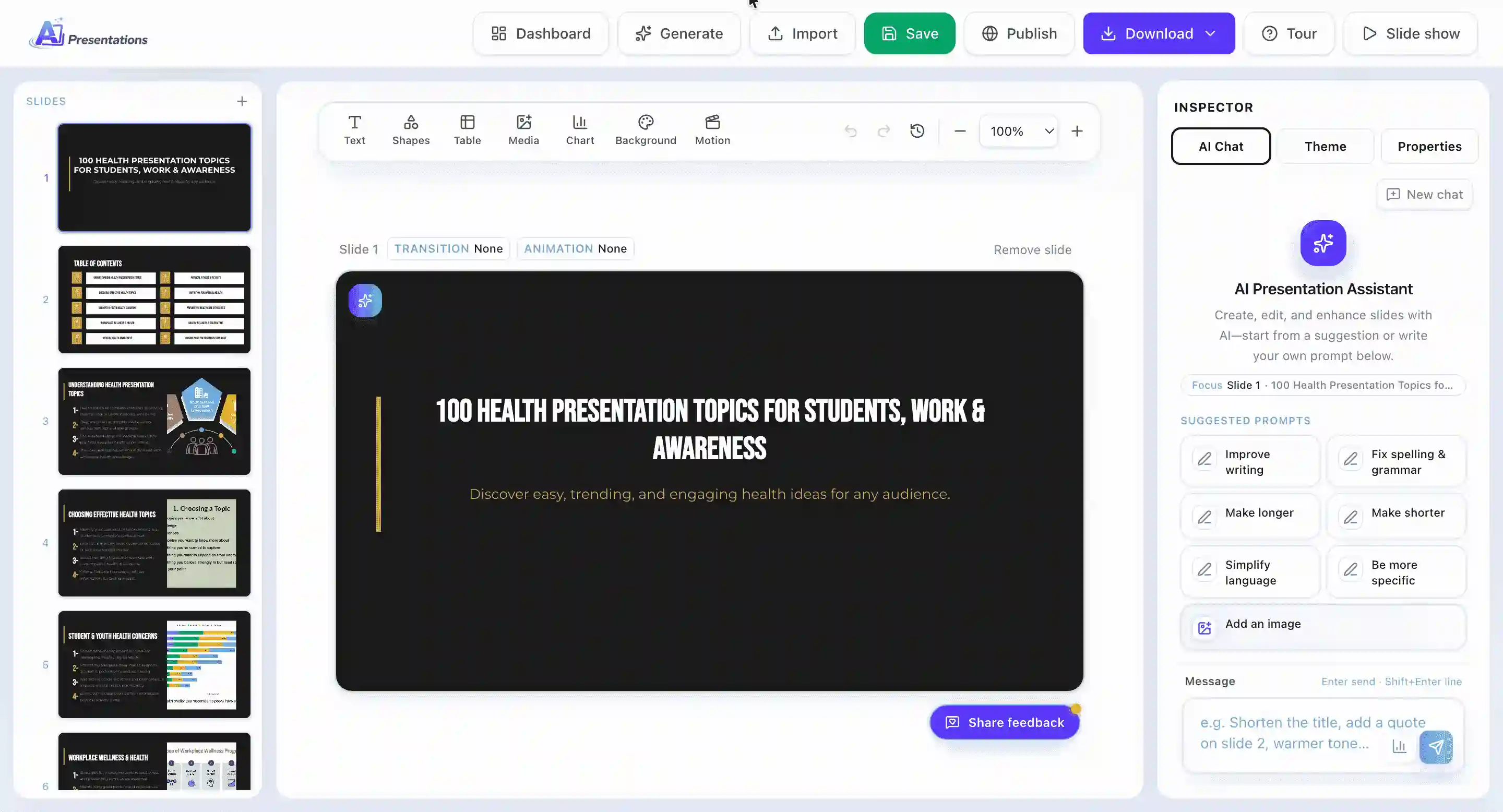
    Edit slide content, adjust layouts, and personalize presentation elements as needed.

    AI Presentations edit slides
  10. 10

    Download and Share

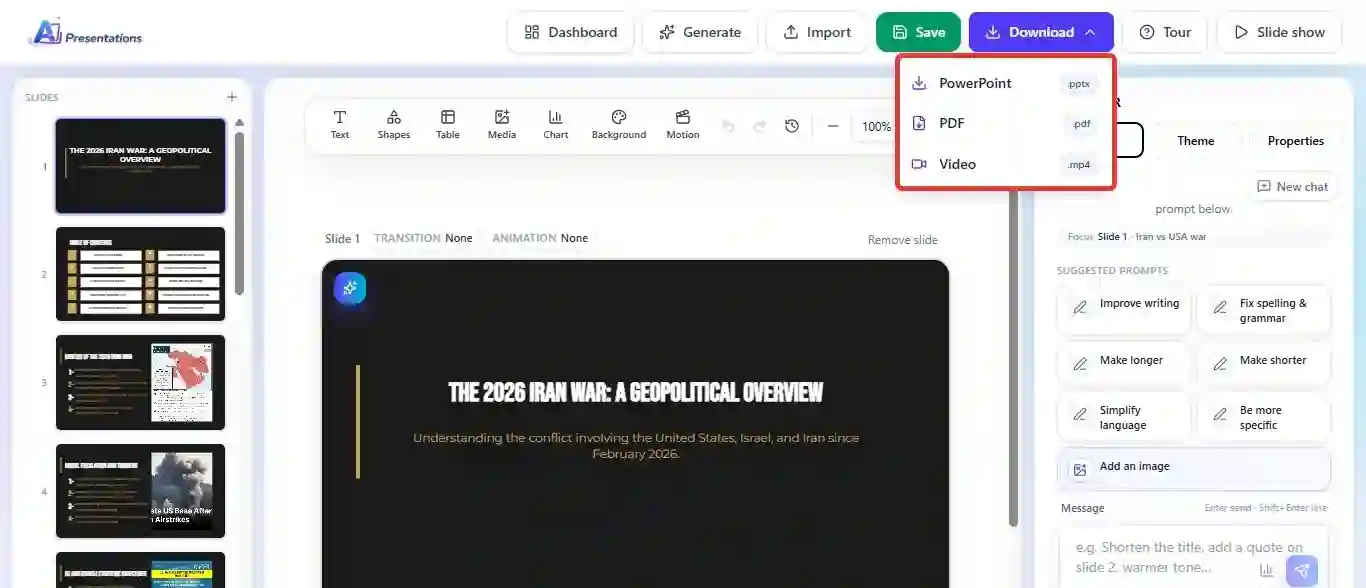
    Export the finished presentation as a PPTX or PDF file for presenting, editing, or sharing.

    AI Presentations export

Creating a Presentation in Tome AI

How Tome AI transforms a prompt into an AI-generated story, pitch, or presentation.

  1. 1

    Create Your Tome Account

    Sign up with Google or email to access the Tome workspace and AI creation tools.

  2. 2

    Start a New Tome

    Create a new Tome from the dashboard and choose the AI-powered generation option.

  3. 3

    Describe What You Want to Create

    Enter a prompt describing your presentation, pitch deck, proposal, report, or story.

  4. 4

    Generate the First Draft

    Tome AI creates a complete narrative structure with sections, content, and visuals based on your prompt.

  5. 5

    Select the Theme

    Examine the AI-created flow and adjust the theme of the presentation slides.

  6. 6

    Generate Presentation

    After editing, finalising them and other details, tap on Generate now to get PPT.

  7. 7

    Add Visual Elements

    Insert AI-generated images, videos, embeds, interactive content, and other multimedia components.

  8. 8

    Customize Layouts

    Modify page layouts, themes, typography, and visual styling to match your brand or audience.

  9. 9

    Share or Present Online

    Publish the Tome as a web-based presentation and share it through a live link for viewing or collaboration.

DEMO

Watch AI Presentations Transform Ideas into Slides

AI Presentations
Our pick

Feature Comparison

The Tools Behind the Presentations

Explore the core capabilities that shape presentation creation, editing, customization, and sharing on both platforms.

FeatureAI PresentationsTome AITome AI
Free planFree foreverDiscontinued
PowerPoint exportDiscontinued
Google Slides exportDiscontinued
Generate from URL / YouTubeDiscontinued
Generate from PDF / DOCXDiscontinued
Sales-focused AI workflowDiscontinued
Generic presentation use casesDiscontinued
AI image generationDiscontinued
Brand kit / fontsDiscontinued
Languages supported100+Discontinued

Presentation Output

Comparing Design Quality and Export Experience

How presentation decks appear after generation, editing, and export.

AI Presentations

AI Presentations is designed to create professional slide decks that maintain their structure, formatting, and editability after export. Presentations are optimised for PowerPoint workflows, making them easy to update, present, and share across Microsoft PowerPoint, Google Slides, and Keynote.

Tome AI

Tome AI

Tome AI focuses on visual storytelling and web-based presentation experiences rather than traditional slide formats. Presentations are designed for online viewing, combining narrative layouts, multimedia elements, and modern design aesthetics. While content can be shared seamlessly through links, users who need conventional presentation files may find fewer editing and export options compared to PowerPoint-focused tools.

Key Takeaway

If your goal is to create interactive, narrative-driven presentations for online viewing, Tome AI offers a strong web-based storytelling experience. If you need editable PowerPoint presentations for meetings, training sessions, academic projects, or client presentations, AI Presentations provides a more practical workflow with reliable PPTX exports and greater presentation flexibility.

AI Content Generation

How Each Platform Creates Presentation Content

AI Presentations

AI Presentations generates structured slide content designed for business, education, training, and professional communication. Users can create presentations from prompts, PDFs, Word documents, URLs, YouTube videos, and other content sources. The AI organizes information into logical sections, slide titles, key points, and presentation-ready layouts that can be edited and refined after generation.

Tome AI

Tome AI

Tome AI focuses on AI-assisted storytelling and narrative development. Instead of building traditional slide decks, it creates content flows that combine text, visuals, and multimedia elements into a cohesive story. This approach works well for pitches, proposals, creative projects, and presentations that prioritize audience engagement over conventional slide structures.

Takeaway

Both platforms can generate high-quality presentation drafts in minutes. Tome AI excels at narrative-driven content and visual storytelling, while AI Presentations is better suited for creating structured, editable slide decks that fit traditional presentation workflows and PowerPoint-based environments.

Pricing Comparison

What Do You Get for the Cost?

Compare plan features, AI generation limits, exports, collaboration tools, and overall value across both platforms.

Strong value

AI Presentations

Pro

$9/mo

  • Generous monthly slide credits
  • PPTX & PDF export
  • Premium themes
  • Priority support
View our plans

Tome AI

Pro

$16/mo

  • Unlimited AI creation
  • PDF export
  • Custom branding
See Tome AI pricing

Advantages and Drawbacks

Where Each Platform Excels — and Where It Falls Short

A balanced look at the strengths and limitations of AI Presentations and Tome AI based on common presentation workflows.

AI Presentations Pros

  • Generate presentations from prompts, PDFs, DOCX files, URLs, YouTube videos, and more
  • Export presentations as editable PPTX and PDF files
  • Full slide customization after AI generation
  • AI-powered content editing and presentation refinement tools
  • Built-in AI image generation capabilities
  • Free plan available for new users
  • Supports multiple languages and presentation use cases

Tome AI Pros

  • Strong AI-powered storytelling and narrative creation
  • Visually engaging, web-native presentation experience
  • Supports multimedia content, embeds, and rich visual layouts
  • Easy online sharing through presentation links
  • Helpful AI writing assistance for expanding and refining content
  • Collaborative workspace for teams and projects
  • Modern interface optimized for interactive presentations

AI Presentations Cons

  • Smaller template library compared to some design-focused competitors
  • Free plan includes usage limitations
  • Primarily designed for slide-based presentations
  • Fewer interactive web presentation features

Tome AI Cons

  • Less focused on traditional PowerPoint workflows
  • Limited emphasis on editable PPTX presentation outputs
  • Not ideal for users who require conventional slide-based presentations
  • Web-first format may not suit every business or classroom environment

Find the Right Fit for Your Presentation Style

Choose the Platform That Aligns With Your Goals

Pick the platform that best matches your presentation workflow.

Pick AI Presentations if…

  • You need editable PPTX presentations for business, education, training, or client work
  • You create presentations from PDFs, documents, URLs, YouTube videos, or simple text prompts
  • Your workflow depends on PowerPoint compatibility after export
  • You want greater control over slide editing and presentation customization
  • You regularly download, present, and share presentation files
  • Structured slide decks are more important than web-based storytelling experiences
Tome AI

Pick Tome AI if…

  • You create narrative-driven presentations, proposals, or startup pitches
  • Interactive storytelling and visual communication are priorities
  • You primarily share presentations through web links rather than presentation files
  • You want to combine text, visuals, videos, and embedded content in a single experience
  • Online collaboration and browser-based presentation delivery are important to your workflow
  • You prefer a modern, web-native format over traditional slide-by-slide presentations

The Verdict

Which AI Presentation Tool Comes Out Ahead?

Tome AI stands out for users who want to create narrative-driven presentations with a strong focus on storytelling, visual communication, and web-based sharing. Its AI-assisted content generation and multimedia-friendly approach make it well-suited for startup pitches, proposals, creative projects, and interactive online presentations.

AI Presentations is the stronger choice for users who need professional slide decks that can be edited, exported, and presented across standard presentation platforms. With support for prompts, PDFs, documents, URLs, and YouTube videos, along with reliable PPTX exports, it streamlines the process of creating presentation-ready files for business, education, training, and client-facing use.

If your goal is to build engaging web-native presentation experiences, Tome AI is a compelling option. If you need editable PowerPoint presentations and a workflow optimized for practical presentation delivery, AI Presentations offers the more versatile solution.

Build Your Next Deck Faster

From Prompt to Presentation in Minutes

Generate structured slides, customize content, and download a presentation-ready deck with AI.

AI Presentations · AI-powered presentation generator

slides

Example prompts

New decks created every day by teams and students

FAQ

Frequently Asked Questions

If your workflow depends on Microsoft PowerPoint, AI Presentations is generally the better choice. It creates editable PPTX files that can be customized after export, making it suitable for business meetings, education, training, and client presentations. Tome AI is more focused on web-based storytelling experiences.

Yes. Both platforms offer export options, but their primary use cases differ. AI Presentations is designed around downloadable presentation files such as PPTX and PDF, while Tome AI focuses more on sharing presentations through interactive web links.

AI Presentations offers broader support for presentation creation from PDFs, Word documents, URLs, YouTube videos, and text prompts. This makes it a practical choice for users who frequently convert existing content into presentation slides.

Yes. Tome AI can be used for business presentations, especially when storytelling, product pitches, proposals, or visual communication are important. However, teams that require editable PowerPoint files may prefer AI Presentations.

Yes. AI Presentations allows users to modify slide content, layouts, visuals, and presentation structure after generation. This gives users greater flexibility when preparing presentations for specific audiences.

The answer depends on your presentation style. Tome AI is well-suited for narrative-driven pitch decks that are shared online, while AI Presentations is ideal for pitch decks that need to be presented, downloaded, and edited in PowerPoint.

Yes. AI Presentations can generate presentations from YouTube videos along with PDFs, documents, URLs, images, and text prompts, helping users turn existing content into structured slide decks.

AI Presentations is often the better option for academic use because it supports traditional presentation formats, editable PowerPoint exports, and content generation from research materials, documents, and educational resources.

Yes. Tome AI is designed around interactive and web-based presentation experiences. Users can combine text, visuals, videos, and embedded content into presentations that are primarily viewed and shared online.

The biggest difference is their approach to presentation creation. AI Presentations focuses on generating editable slide decks for PowerPoint workflows, while Tome AI focuses on AI-powered storytelling and interactive web presentations designed for online viewing and sharing.